Most people use the 3DS to learn Japanese through games, but they’re usually already a bit fluent since they play games entirely in Japanese. But what about those who are just starting and want to learn from the beginning? That’s where the NDS game : My Japanese Coach comes in.
Video of me playing the game
My Japanese Coach is a game designed to help English speakers learn Japanese from the ground up. It was developed by Sensory Sweep Studio, and they didn’t just create a Japanese version. There are also Spanish, Italian, and Chinese versions available.
The game starts by teaching you in romaji and then introduces katakana and hiragana before moving on to a few kanji lessons.
The game will teach you grammar and vocabulary while gamifying the learning process into test questions. There’s a writing test where you use your stylus to draw katakana and hiragana, as well as matching puzzles and word searches. Each time you finish a certain number of lessons and mini-games, you’ll move on to the next topic in the syllabus.
And don’t worry , Even if you don’t have an NDS you can emulate it on a smartphone and use the touchscreen to mimic the console experience.
If, for example, you own an NDS console, you can buy the game below. For every purchase made through the link, I’ll earn a commission at no extra cost to you.
Study Japanese Using a DS Emulator and My Japanese Coach

This guide will teach you how to play My Japanese Coach on a Android smartphone. All you’ll need is a basic stylus, your phone, and the game’s ROM. I won’t tell you where to find the game that’s something you’ll have to figure out on your own, but it’s pretty easy to locate.
SOFTWARE
- Retroarch or MelonDS for android
- My Japanese Coach Rom
You can choose to install either RetroArch or melonDS directly. For this guide, I’ll be using melonDS since we’re aiming for the easy and simple method.
- Download MelonDS , install it on your phone by allowing everything it needs. Or you could download it from Google Play store. The process of installing it is the same.
- It’s about time you try Googling for the My Japanese Coach ROMs.
- If you decide to install MelonDS from GitHub, Android may show a false negative error and prompt you to either ignore it or continue with the installation. Go ahead and choose “Continue.”
- Open up melonDS, and you’ll be greeted with a message that says “No ROM search directory specified.” Click on “Set ROM Directory.”
- On my phone, I set the ROM directory to Download/Roms. Just navigate to the Downloads folder and create a new folder. Name that folder “ROMS” Then, place the My Japanese Coach ROM file in that folder.
- Allow melonDS to access the ROMs in the “roms” folder, and it will load all the available NDS ROMs.
- Play the game!
TROUBLESHOOTING BUTTONS
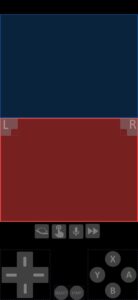
When you open the game, you might notice that some buttons are blocking the touch screen input. What you need to do is go to melonDS settings, then navigate to Input > Layout and create a new layout. Move the obstructing buttons away from the touch areas, and everything should work smoothly!
That’s all from me for today! Enjoy learning with those gamified Japanese lessons!